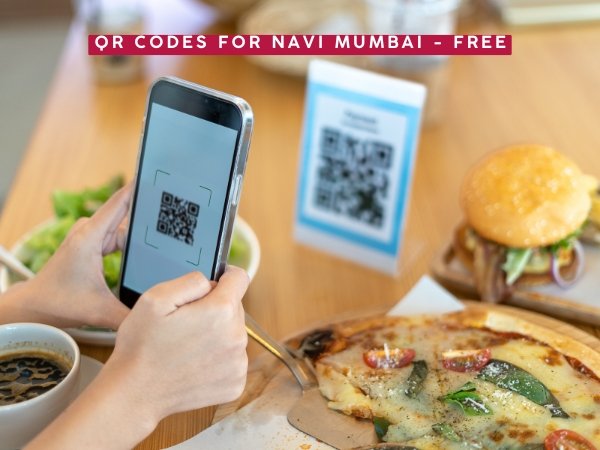
Walk into almost any restaurant in Mumbai today — whether it’s a table in Kharghar, a stall in Bandra, or a café in Andheri — and you’ll find a small QR code stuck to the table instead of a laminated menu. It’s become the default way small businesses across Mumbai handle everything from menus to payments to Instagram follows — but most business owners we’ve spoken to are still using whatever generator popped up first on Google, often one that watermarks the code or expires it after a free trial. Here’s how to actually use QR codes well for a local business, and a genuinely free tool to make one.
Why Local Businesses in Mumbai Are Leaning on QR Codes
A few real, practical reasons this has caught on so fast — from Navi Mumbai nodes like Kharghar and Vashi to South Mumbai and the western suburbs:
Menu updates without reprinting — a QR code linking to a digital menu means price changes or new items don’t require another trip to the printer
Faster table turnover — customers browsing a menu on their own phone tend to order faster than waiting for a physical menu to free up
Instagram growth — a QR code on a table tent or receipt that links straight to a business’s Instagram profile converts walk-in customers into followers far better than asking verbally
Google review capture — a QR code linking directly to a business’s “Write a review” link on Google Maps removes almost all friction from getting reviews, which matters enormously for local search ranking
If you run a shop or restaurant anywhere in Mumbai and haven’t set this up yet, you’re leaving an easy win on the table.
What You Can Actually Put a QR Code On
This is broader than most business owners realize:
Use Case
What It Links To
Table menu
PDF or webpage of your current menu
Instagram growth
Direct link to your Instagram profile
Google reviews
Your Google Business “write a review” link
Business card
A digital vCard or your website
Event flyer
A registration form or location pin
Packaging
Your website, offers page, or WhatsApp Business number
Shop window
Your online store or catalog
How to Make One — Step by Step
Here’s the exact process using our own free QR code generator — no signup, no watermark, and the codes never expire since they’re static.
Decide what you’re linking to first. This matters more than people think — a QR code linking to your Instagram profile drives followers, but if you actually want reviews, it needs to link to your Google review page specifically, not your general Maps listing.
Paste the link into the generator. Go to the QR code generator, paste your link or text into the box.
Pick your colours. Use a style preset, or match your brand colours if you have them. Just keep the code noticeably darker than the background — this isn’t a style choice, it directly affects whether phone cameras can scan it reliably.
Add a caption. Something like “Scan to view menu” or “Scan for 10% off” gives people a reason to actually use the code instead of walking past it.
Download the PNG and print it. Since these are static codes, they work forever — print them once and they’ll never stop working, unlike some free tools that quietly deactivate codes after a trial period.
A lot of the popular international QR generators (Canva, Adobe Express, several others) either put a logo watermark on the free tier, or push you toward a “dynamic” QR code that requires an ongoing subscription to keep working. Static codes — like the ones our generator makes — don’t expire and don’t need any subscription, which is genuinely all most small businesses need.
Where to Place Your QR Code for Maximum Scans
Placement matters as much as the code itself:
Eye level or table level — a code stuck too high or too low gets ignored
Near good lighting — a code in a dim corner is hard for phone cameras to focus on
With a clear caption — “Scan to order” converts far better than a bare code with no context
At least 2×2 cm printed size — smaller codes struggle to scan reliably, especially from a slight distance
A Few Local Examples Worth Considering
Whether you’re running a business in Kharghar, Vashi, Bandra, or anywhere else across Mumbai, here are a few specific, practical setups:
Restaurants (like the misal and wada pav spots around Kharghar Sector 12, or a stall in Dadar) — a table-tent QR linking to your Instagram, paired with a caption like “Follow for today’s specials,” works especially well for food stalls with rotating daily items
Cafes — pairing a QR code with your WiFi details (network name and password written directly under the code) is a small touch that genuinely improves the customer experience, whether you’re in Powai or Panvel
Retail shops — a QR code near the billing counter linking to your Google review page is one of the highest-ROI placements possible, since customers are already in a positive mindset right after a purchase
Event organizers (Daud Adda and similar community meetups, running groups, local pop-ups) — a QR code on a printed flyer linking straight to your Instagram or a WhatsApp group join link removes the friction of typing a handle from memory
Static vs Dynamic QR Codes — Which Do You Actually Need?
Most guides make this more complicated than it needs to be for a small business:
Static QR codes — the link is baked permanently into the code itself. Free forever, never expires, but you can’t change the destination later without printing a new code.
Dynamic QR codes — the code points to a redirect link you can update later, and usually comes with scan-tracking analytics. Almost always requires an ongoing subscription to keep working.
For the vast majority of local business use cases — a menu, an Instagram link, a review page — a static code is genuinely all you need, and it means never having to think about it again once it’s printed. Dynamic codes make sense mainly for larger campaigns where you need to track exact scan counts or might change the destination frequently.
A Word on QR Code Safety
Worth flagging honestly, especially as QR codes have become more common: scammers occasionally replace legitimate QR codes in public places with malicious ones (a practice sometimes called “quishing”). A few sensible precautions if you’re placing codes in a public-facing spot:
Check your printed codes periodically to confirm nothing’s been tampered with or stuck over
If you’re a customer scanning a code somewhere unfamiliar, glance at the preview URL your phone shows before tapping through, rather than opening it blindly
Our Take
QR codes have gone from a novelty to genuinely essential infrastructure for small businesses across Mumbai — and the good news is you don’t need a subscription or a design agency to use them well. A static code, placed thoughtfully with a clear caption, does the job for the vast majority of local use cases. If you run a business here and haven’t set one up yet, it’s a five-minute job with real payoff, whether that’s more Instagram followers, faster table turnover, or simply more Google reviews.